Tampilkan postingan dengan label Plugin. Tampilkan semua postingan

Selasa, 25 Juni 2013

Magento Running Text Special Product


Description

This extension show your special product with cool running text above navigation bar. This running text bar will displayed on every page your magento store. With easy installation & configuration and full custom color your running text bar and will help increase your magento store.

Feature List:
- Unlimited Color Running Text Bar
- Order Running Text Special Product by Amount Discount, Remaining Discount Time,
- Clickable Running Text Product
- Set Maximum Product Displayed on Running Text
- Change Running Text Direction (left or right)
- Automatic Display Remaining Time
- Enable/Disable Remaining Time
- Enable/Disable Open Link New Window Running Text Product


Category : Plugin, plugins, magento-extensions | Rating: 5.0 out of 5.

Prestashop LegalWarning Module


Description

Limit access to your website with a warning. You can place images, videos, and text in the warning, and redirect to another site if you do not accept the terms.

This module is ideal for adult sites, or sites that need to show terms and conditions before entering.

You can configure the windows size, the title and content (can be images, text or videos), the cookie expiration time, and the url redirect if the user cancel to enter the site.

Features:

  1. Multilingual
  2. Can upload images, text or videos to the popup
  3. Cross browser


Category : Plugin, plugins, prestashop | Rating: 5.0 out of 5.

Magento Coupon Time


Description

While developing Magento stores, we have found one of the most common request is Adding start time and end time function to Shopping Cart Price Rules Magento Feature.


Category : Plugin, plugins, magento-extensions | Rating: 5.0 out of 5.

Social Count ShareThis Prestasop


Description

This module to encourage users to follow your corporate social profiles and share store products via social networks. Share on social network. The module includes 20 social networks.Module contains the most popular and desired features to share site and make it much more better: Pinterest button, Facebook like button, Tweet button, Google + 1 and other.Increase your visibility by allowing your visitors to share the pages of your shop by mail or through social networks. Add Key in configuration module in your account statistic sharethis.com


- Enable and Disable social button in configuration admin panel.
- Past or edit your unique ShareThis publisher key in configuration module.
- Increase your visibility by allowing your visitors to share the pages of your shop by mail or through social networks.
- Your products will be published in many websites.
- Increase your traffic Search Engine Optimization by create backlinks to your shop.
- Cross browser.
- Compatibility: PrestaShop 1.5.x.
- Easy installation

The Share Buttons can be attached on the following PrestaShop hooks :

  • rightColumn
  • leftColumn
  • home
  • top
  • extraRight
  • footer

If you click Facebook like button or Google + 1 or Pinterest like button then product image will appear on your wall. You can set up “Facebook Like Default Image” and if you are not on the product page then it appears on your facebook wall. Twitter share message name product.Simple installation and configuration.

Demo


Check out the back office demo to see what you will get.
Front office
Back office
email : admin@admin.com
pass : admin2013

Documentation

Changelog


Version 1.1


  • Add new button
  • Add new position button
  • Add new Bar left of the page (add position module Top)



Category : Plugin, plugins, prestashop | Rating: 5.0 out of 5.

Content Popup Product Page


Description

Display different popup on each prooduct detail page, with delay popup function, you can display popup for:- Advertising- Text with Image- Banners- Promotions- etc..


Category : Plugin, plugins, magento-extensions | Rating: 5.0 out of 5.

One Step Check Extension For Magento


Description

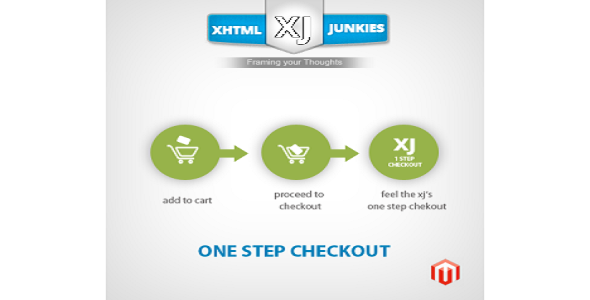
When you shop online and place an order, the difficulty that you may usually come across is going through the checkout process. Checking out process is generally the foremost difficult part of placing an order online, and plenty of users might end up dropping their order.

Some customers are motivated enough to buy in spite of however tough it is – however others are lost owing to checkout complexes.

One-step-checkout greatly simplifies this method, resulting in an on the spot increase in sales. This finest solution is thoroughly tested extension and offer great support if you run into problems and bring you the best possible check out the results.

Default magento check out is 5 steps process and we had made that in 1 screen using AJAX so it will help visitor to checkout comfortable.


Category : Plugin, plugins, magento-extensions | Rating: 5.0 out of 5.

OCArabia QR Code Generator


Description

QR Codes (Quick Response Codes) are two dimensional barcodes. Most smartphones such as iPhones and Andriod phones let you visit a website through a QR Code without the use of a link or any other text.

You can generate QR Codes quickly and easily and use these codes to either guide the customer to their mobile website or directly to the shopping app. The advantage of these QR Codes is that they are perfectly adapted to the corresponding shop and allow the use of coupons and special deals, which turns every advertisement into a shopping opportunity.

Featured:

  • OCArabia QR Code Generator module for OpenCart .
  • Product URL is going to be encoded .
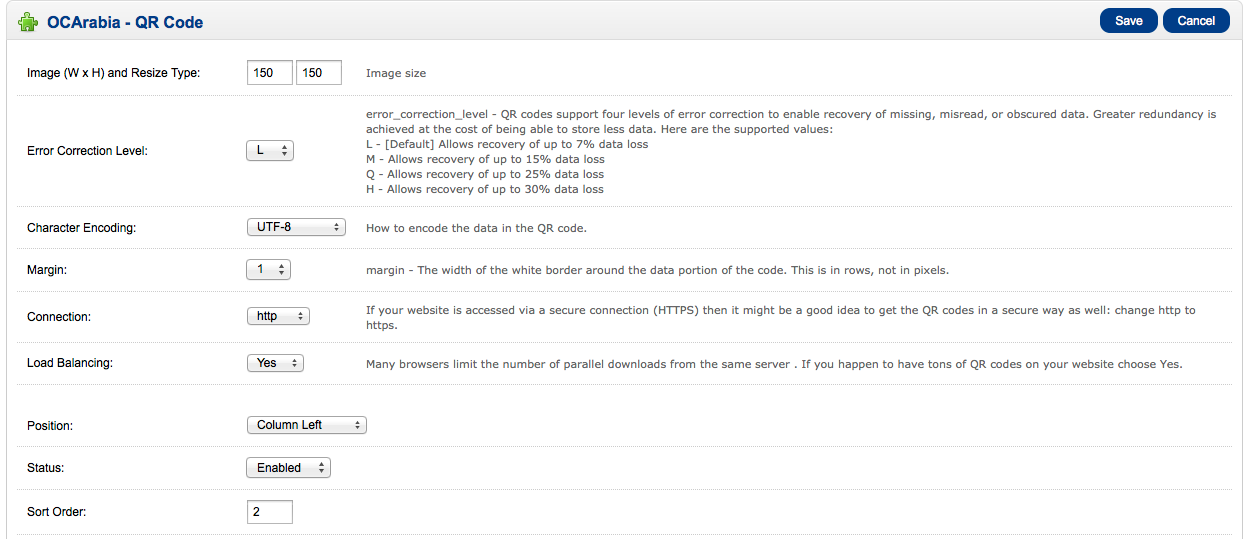
  • You are able to choose the QR code image size
  • You are able to choose the qr code encoding type.
  • L allows 7% of a QR code to be restored, M allows 15%, Q allows 25%, H allows 30%
  • Simple installation and configuration
  • Cross browser.
  • Tested on OpenCart version 1551.
  • You can get the product qr code image link to use in newsletter template or ads any where
  • Ex. http://YOUR-DOMAIN/index.php?route=module/ocarabia_qrcode/qrcode&product_id=[product id] replace [product id] by an integer number which is the product id.

Look like this :)

Configuration setting admin panel


Category : Plugin, plugins, opencart | Rating: 5.0 out of 5.

Egolt Archive Pro


Description

Egolt Archive provides the ability to present content and any other content source in different intervals of time that you need to archive and search. This ability is not embedded in the Joomla! core ,however is very practical and necessary.

There are many options that you could use it in this product. You can archive not only Joomla! Content, but other sources like content systems, shopping systems, download services and etc. Smart minimum and maximum time interval are selected from contents.

Egolt Archive is support Gregorian(international) and other calendars (like local calendars).

There are many modules which provided to help users to use the Egolt Archive in flexible and different situations.

Egolt Archive is based on Egolt Framework; flexible and powerful extension framework that is built by Egolt Foundation to increase the power, compatibility and reduce the bugs of the Egolt products.

Userguide & Documentation

To see the complete userguide and documentation about Egolt Archive Pro, click here.

Don’t forget to rate ,If you enjoy the Egolt Archive Pro!

Features

General
  • Annual selection
  • Monthly selection
  • Duration selection
  • Between Dates selection
  • Categories Search
  • Authors Search
  • Change Ordering
  • Include Text Search
  • Not Include Text Search
  • Advanced SEO
  • No Hidden Links
  • No Copyright Footer
Archive Sources
  • Joomla! Content
  • K2
  • jDownloads
  • VirtueMart
Calendars
  • Gregorian(international)
  • Solar Hijri
View Types
  • Text and Image
  • Title Only
  • Feed
  • Photo Gallery
Modules
  • Search Module
  • Date Module
The package included
  • Egolt Archive Component
  • Egolt Archive Search Module
  • Egolt Archive Date Module
  • Egolt Framework Library
  • Egolt Framework Trigger Plugin


Category : Plugin, plugins, joomla | Rating: 5.0 out of 5.

Magento Popup Content With Floated Button


Description

Display floated button with popup content, this extension have following features:
- Float Button to Left / Right
- Change Button Image
- Fancybox Popup Content


Category : Plugin, plugins, magento-extensions | Rating: 5.0 out of 5.

OpenCart Custom T-Shirt Design


Description

View The Online Documentation

Check The Demo

Opencart Custom T-Shirt Design

“Custom T-Shirt” Module is an open cart module which is used to design or customize T-shirts. By this module customers can design the t-shirt as per their need such as add Text , Number or Logo by different Color, Font Size, Alignment and many more. Customers are able to design their own t-shirt and they can upload a logo to different positions (left, center, right) of t-shirt or can select existing logo from the sample items.

“Opencart Custom T-Shirt” module has some excellent features and very easy to install or setup. No need to replace files or others actions just upload the setup folder to the directory and hit the url (www.yoursitename.com/setup). It is one click setup.

“Opencart Custom T-Shirt” module is more flexible and compatible with many existing modules in the OpenCart repository. This Module is fully customizable. Users can easily configure the module into the new or existing OpenCart websites. This Module is compatible for version 1.5.3.1, 1.5.4, 1.5.4.1 and 1.5.5.1 (tested).


Add Name and Number


All Product View


Single Product View


Some Features of Opencart Custom T-Shirt:

  • Shoppers can Upload their own Design/Image/Logo to print on T-shirt while shopping.
  • Add Text or Number on the t-shirt product.
  • Can select an Image/logo from the existing logo/images to put on the t-shirt.
  • Change the Color, Size and Style of the Text or Number.
  • Place Text or Images in Three different Positions (left, center, right) of the t-shirt.
  • Shows Preview mode of the T-shirt as designed.
  • Shoppers can add to cart same product with customization or without customization and price will be different for that purpose.
  • Shoppers can view the customized product (text or uploaded image with position) from his own account (View your order history > view).


Admin Features of Opencart Custom T-Shirt:

  • 7 (Seven) Types of Popup themes available with preview.
  • Admin can set the Price for “Custom Design” and “Design Tool Preview Background Color” from Catalog > Products > Custom Design Tab.
  • Admin can change “Background Color”, “Font Color” and “Text Bold” from Template section (ex. catalog/view/t_shirt_theme).
  • Admin can customize “Price Text”, “Price Text Color”, “Price Text Decoration” and “Popup Top Text”.
  • Admin can Design Button by customizing “Text”, “Font Size”, “Font Weight” and “Color”.
  • Admin can show the “T-Shirt Design Link” in all pages or at some selected pages (ex. Featured Module, Bestseller Module, Latest Module, Product Details Page, Search Page, Category Page etc. In Grid View or List View).
  • Admin can view the customized product (text or uploaded image with position).


Category : Plugin, plugins, opencart | Rating: 5.0 out of 5.

XJ Product Sticker Extension


Description

XJ Product Sticker Extension makes your product noticeable i.e it gives and enhance visibility to your “New, Hot, Have special price Offer selling products ” and it attracts clients to get to know more about the product. In short, it would provide and extra support for your best selling product to promote more and more day by day giving a boost to your sales of that partiuclar product.

XJ Sticker extension has come up with many exciting features. The features are specially designed for easy administration and control. This user friendly interaction makes customers to visit your site again and again, thus providing more increase in the sales.With this extension, your store will display graphical NEW or SALE stickers on your product images, improving its impact on your customers!

Step1: To enable Sticker on front-end Go to System > Configuration > XJ Extensions > XJ Sticker.

Step2: To add New Sticker go to Stickers > Manage Your Stickers Click on add new. Enter the required fields and upload .png image only. It is advised to upload 128px * 128px image for better results.After adding all required fields click on Save Sticker. Now it will show all the existing Stickers.

Step3: To add sticker on products go to Catalog > Manage Products and select any product Now click on Related Xj Stickers for list of stickers Select the related sticker you want and then click on Save. Now your Sticker Product is ready on Front-end.


Category : Plugin, plugins, magento-extensions | Rating: 5.0 out of 5.

Shipping Location Map Extension


Description

Magento Shipping Location Map is based upon Google Maps. Customers can select an area which is saved in their orders. Our main motto of developing this extension is to provide customers a very user-friendly experience to find which store is closer to their home.

Shipping Location Map Extension is an awesome and extremely useful application to find out nearest stores based upon their automatically detected location by Google maps.

Its really simple to install in your magento.Lets have a look at simple installation steps that are to be followed to use this extension.

Step1: Grab out the extension zip file and set all files and directories as per given path.

Step2: Once you login, you can find Customer Map in navigation menu of your admin panel.

Step3: Now you can see all Customer’s address whose status are under ‘Processing’ in your Google Map.


Category : Plugin, plugins, magento-extensions | Rating: 5.0 out of 5.

QR Code Module Prestashop


Description

Customers benefit by getting a more accessible user experience. This is achieved by enabling them to scan the QR code on their smart phone or mobile device and take it on the go with them, and also by providing them with a way to contact merchants easily without having to look for and enter contact information.Merchants can create promotional pages and add the generated QR image to products or promotional material, which can be scanned by customers to quickly enter competitions, recieve special offers or view new products.QR codes also present a simply way for customers to share product pages with friends without having to remember long URLs


  • Configuration setting admin panel.
  • You are able to choose the QR code image size.
  • You are able to choose the qr code encoding type.
  • Present product’s URL or your own text to encode.
  • L allows 7% of a QR code to be restored, M allows 15%, Q allows 25%, H allows 30%.
  • Generate a Qr code to link your products.
  • Simple installation and configuration.
  • Cross browser.
  • Compatibility: PrestaShop 1.4.8, PrestaShop 1.4.9, PrestaShop 1.5.x, Last version.
  • Support and help


The QR code module can be attached on the following PrestaShop hooks :

  • RightColumn
  • LeftColumn
  • ProductActions
  • ExtraLeft
  • Footer


Check out the back office demo to see what you will get.
Front office
Back office
email : admin@admin.com
pass : admin2013

Documentation


Category : Plugin, plugins, prestashop | Rating: 5.0 out of 5.